Enron history data groups are used to read historical data from a field device using the protocol described in the Enron Modbus specification.
Enron history data group names are not constrained, but the dgCat attribute must be set to enronHistory in order to properly define the data group. A device can have several types of historical data, such as hourly and daily data, and Enron history data groups can be created to accommodate such types. An Enron history data group is the source of history data for FMS.
Historical index values and record timestamp values are cached for each successful and partially successful Enron history data group/ordinal retrieval. Cached transaction information is stored in the Device Definition Service (DDS) transaction as data group elements.
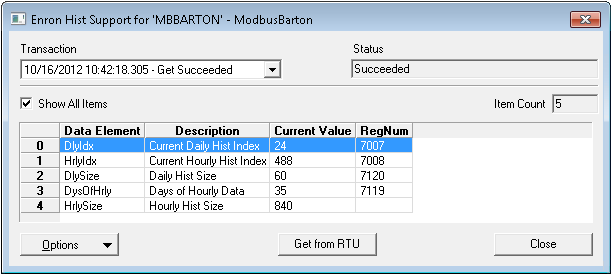
Some transaction details, including the current historical index and the maximum size of an index, are displayed on a per-transaction basis in the Enron history support data group data dialog box. Individual history record data, including retrieved values, is displayed in separate Enron history data groups. History retrieval optimization is based on historical index values and record timestamp values, which provide a starting point for subsequent optimized retrievals.
Enron history data groups depend on support data groups. Such data groups are defined in the supportDg element in the Enron history data group.
Click the following image for more information:
Enron history data groups require a modbusReadBlocks element within the data group in the device template file.
For more information, see the following subsections:
For more information about working with device template files, see Device Template Files.
 Click here to see an example of the data group Click here to see an example of the data group
<HistHry niceName="History - Hourly" dgCat="enronHistory" baseOrd="1" maxCnt="10" leadingTime="true" recordMinutes="60" queueSize="1080"> <supportDg> <HistIdx deidIndex="HrlyIdx"/> </supportDg> <dgElements byteOrder="bigEndian" secLev="4" type="r4"> <HistDate desc="Date" off="0" hidden="true"/> <HistTime desc="Time" off="4" hidden="true"/> <DateTime desc="DateTime" type="r8"/> <FlowTime desc="Flow Time" off="8" units="min"/> <FlowVol desc="Flow Volume" off="12"/> <FlowE desc="Energy" off="16"/> <FlowExt desc="Flow Ext " off="20"/> <AvgTemp desc="Temp" off="24"/> <AvgSP desc="SP" off="28"/> <AvgDP desc="DP/Pulses" off="32"/> <Index desc="Record Index" type="i4" hidden="true"/> </dgElements> <uccRecvParms> <SDate required="false" desc="Start Date" type="string"/> <EDate required="false" desc="End Date" type="string"/> <Cnt required="false" desc="Max Records to Read" type="ui2"/> <Seq required="false" desc="Starting Sequence Number" type="ui4"/> <GetLatest desc="Get Latest?" type="boolean" required="false"/> </uccRecvParms> <modbusReadBlocks> <block1 funcCode="3" regNum="701" ordIncrement="10" regCnt="1" regByteLen="4"/> </modbusReadBlocks> </HistHry> |
|
Click here to see the structure and components of the data group
<!-- DateTime represents a standard timestamp (COleDateTime) calculated from the HistDate and HistTime data group elements. HistDate represents the event date. HistTime represents the event time. -->
<HistHry niceName="History - Hourly" dgCat="enronHistory" > <supportDg> <HistIdx deidIndex=""/> </supportDg> <dgElements> <HistDate off=""/> <HistTime off=""/> <DateTime type=""/> <FlowVol off=""/> <FlowE off=""/> <FlowExt off=""/> <AvgTemp off=""/> <AvgSP off=""/> <AvgDP off=""/> <Index type=""/> </dgElements> <uccRecvParms> </uccRecvParms> <modbusReadBlocks> <block1/> </modbusReadBlocks> </HistHry> |

|
|
|

